谷歌翻译为何退出中国?
说实话,可能只有谷歌内部知道真实的原因,但现实展现给网友的理由好像有点牵强了。
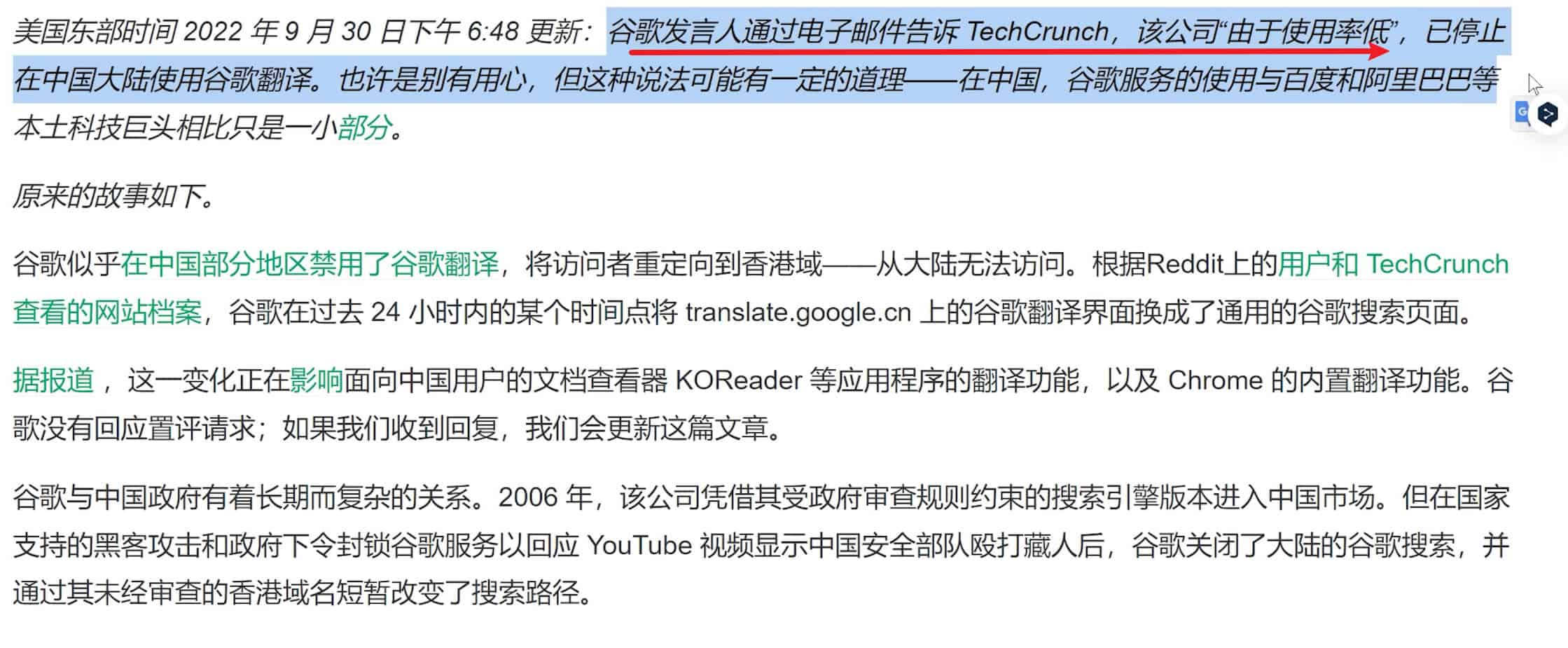
不过谷歌翻译功能在中国大陆确实没有任何盈利方式的,站在企业利益角度来看,没有盈利的产品,公司还需要进行维护确实有一定的压力的。而国内使用谷歌翻译的域名为translate.google.cn 经常会遭到DNS的解析污染,会跳转出各种乱七八糟的广告,DNS污染是没办法通过自身技术来进行修复的。谷歌官方这次索性就不去修复了,把在中国大陆谷歌翻译的网站给关闭掉了。

如果你有学习和工作上的需要使用谷歌翻译,如何在不科学上网情况下来实现随时随地使用google翻译,应该如何操作呢?接下来为大家分享3种不同的解决办法:
第一种方法:修改电脑系统hosts文件
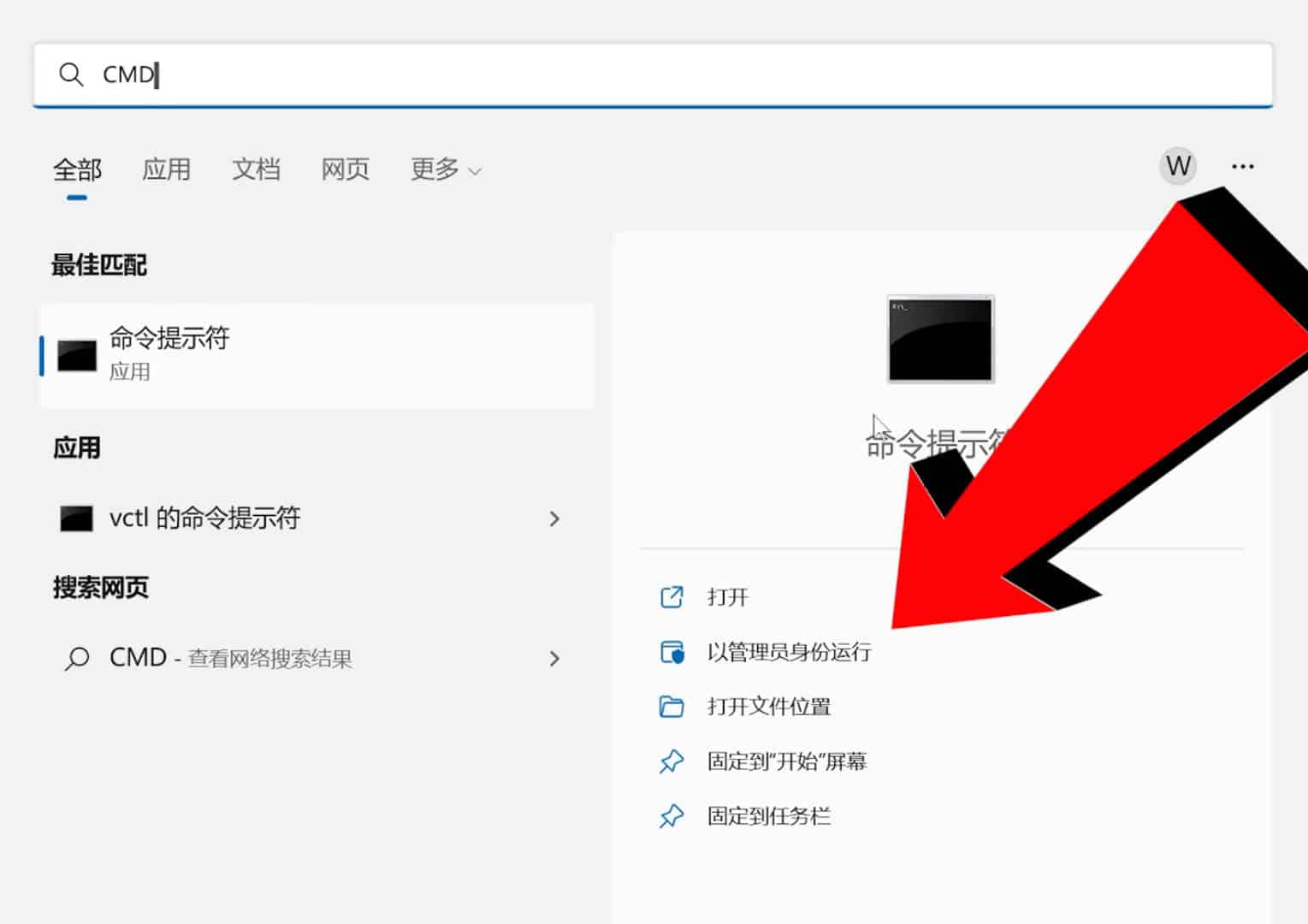
1、win11系统电脑打开搜索,输入cmd,以管理员身份运行
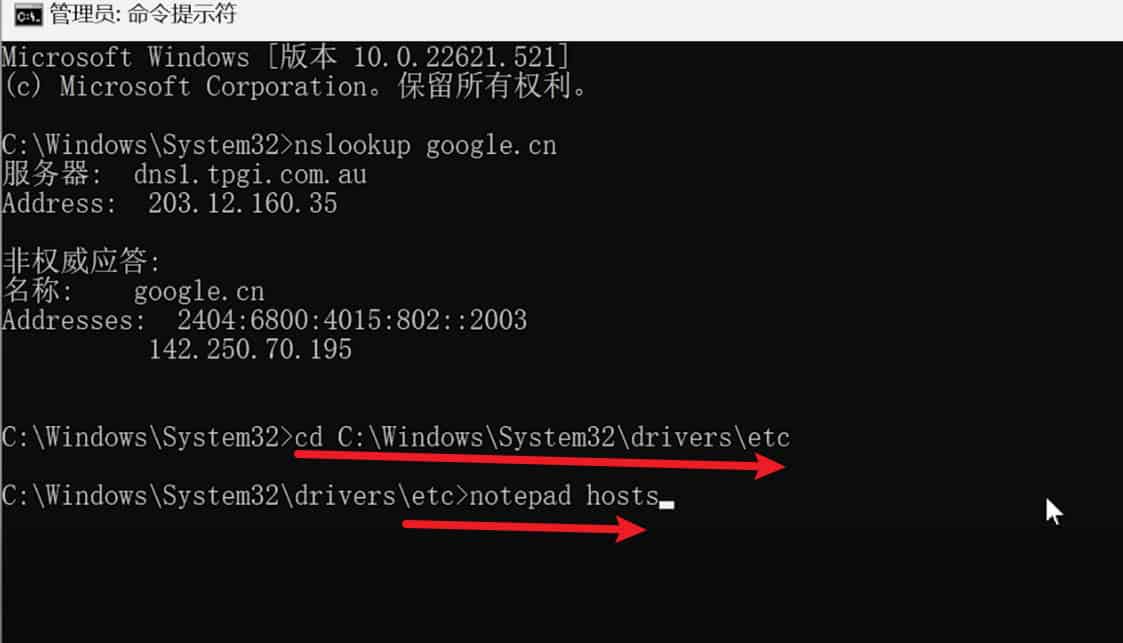
2、输入第一条命令:nslookup google.cn
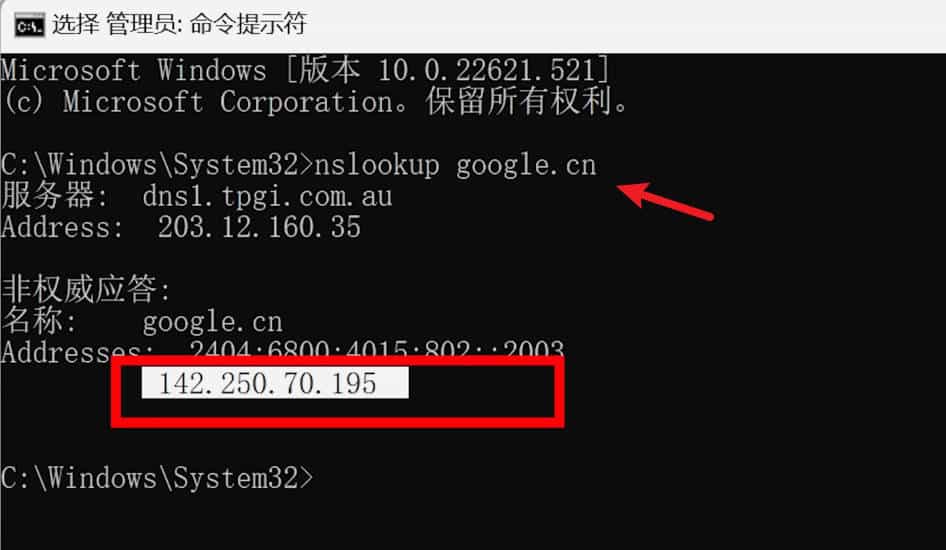
由上图可看到你当前访问谷歌的ip为 142.250.70.195 每个人电脑上出来的这个ip地址是不一样的,我们先把这个ip地址给复制下来,一会儿修改hosts文件会用到。
3、现在找到系统hosts文件,在电脑系统c盘,目录为:c:/windows\system32\drivers\etc
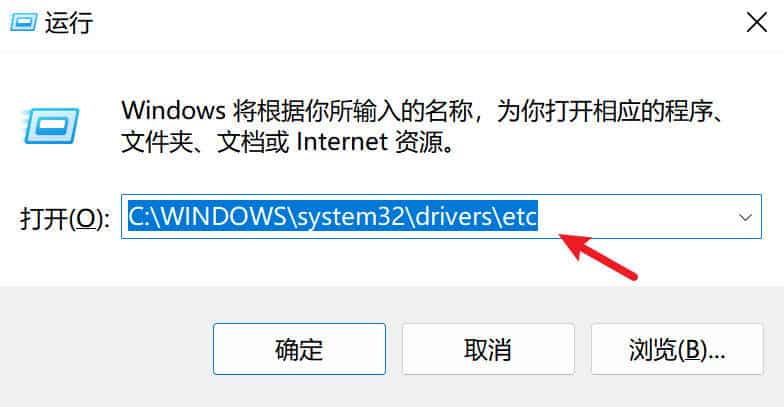
或者在命令行模式下输入 cd C:\windows\system32\drivers\etc 进入hosts文件,在输入notepad hosts 命令,用记事本打开hosts文件
4、在hosts文件最后添加上一条 142.250.70.195空格translate.googleapis.com,点击左上角文件——保存。
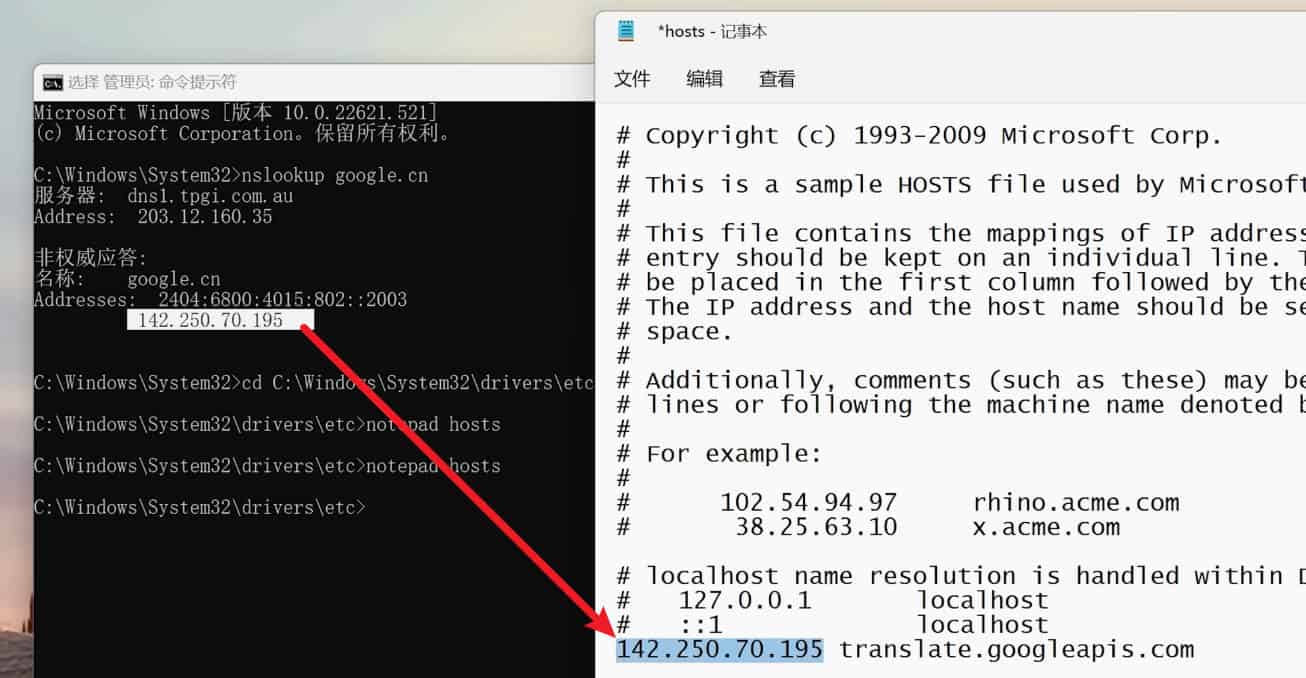
现在你的电脑又可以使用谷歌翻译了,但这种方法是有弊端的,因为谷歌翻译对应api接口这个ip不是固定的,说不定哪天这个ip也会被gwf给墙了,那之前在hosts文件里添加的这个ip就失效了,得用这个方法重新获取新的ip添加进去才能再次使用谷歌翻译。如果觉得每次手动去修改hosts文件比较麻烦的话,接下来第2种方法,你一定要收藏起来!
第二种方法:全自动批处理代码修改hosts文件
下面是获取可用 IP 地址以及修改 Windows 系统和 macOS 系统 hosts 文件的自动化脚本代码
1、Windows 系统复制以下代码
:: Copyright (c)2022 https://bookfere.com
:: This is a batch script for fixing Google Translate and making it available
:: in the Chinese mainland. If you experience any problem, visit the page below:
:: https://bookfere.com/post/1020.html

@echo off
setlocal enabledelayedexpansion
chcp 437 >NULL

set "source_domain=google.cn"
set "target_domain=translate.googleapis.com"

set "hosts_file=C:\Windows\System32\drivers\etc\hosts"
for /f "skip=4 tokens=2" %%a in ('"nslookup %source_domain% 2>NUL"') do set ip=%%a
set "old_rule=null"
set "new_rule=%ip% %target_domain%"
set "comment=# Fix Google Translate CN"

for /f "tokens=*" %%i in ('type %hosts_file%') do (
    set "line=%%i"
    :: Retrieve the rule If the target domain exists.
    if not "!line:%target_domain%=!"=="%%i" set "old_rule=%%i"
)

if not "%old_rule%"=="null" (
    echo A rule has been added to the hosts file.
    echo [1] Update [2] Delete
    set /p action="Enter a number to choose an action: "
    if "!action!"=="1" (
        if not "%old_rule%"=="%new_rule%" (
            echo Deleting the rule "%old_rule%"
            echo Adding the rule "%new_rule%"
            set "new_line=false"
            for /f "tokens=*" %%i in ('type %hosts_file% ^| find /v /n "" ^& break ^> %hosts_file%') do (
                set "rule=%%i"
                set "rule=!rule:*]=!"
                if "%old_rule%"=="!rule!" set "rule=%new_rule%"
                if "!new_line!"=="true" >>%hosts_file% echo.
                >>%hosts_file% <NUL set /p="!rule!"
                set "new_line=true"
            )
        ) else (
            echo The rule already exists, nothing to do.
        )
    )
    if "!action!"=="2" (
        echo Deleting the rule "%old_rule%"
        set "new_line=false"
        for /f "tokens=*" %%i in ('
            type "%hosts_file%" ^| findstr /v /c:"%comment%" ^| findstr /v "%target_domain%" ^| find /v /n "" ^& break ^> "%hosts_file%"
        ') do (
            set "line=%%i"
            set "line=!line:*]=!"
            if "!new_line!"=="true" >>%hosts_file% echo.
            >>%hosts_file% <NUL set /p="!line!"
            set "new_line=true"
        )
    )
) else (
    echo Adding the rule "%new_rule%"
    echo.>>%hosts_file%
    echo %comment%>>%hosts_file%
    <NUL set /p="%new_rule%">>%hosts_file%
)

echo Done.
pause
把上面代码复制出来放到新建的txt文本文档里面,保存后关闭txt文件,然后把txt文件后缀名改成.bat 回车点击-是。
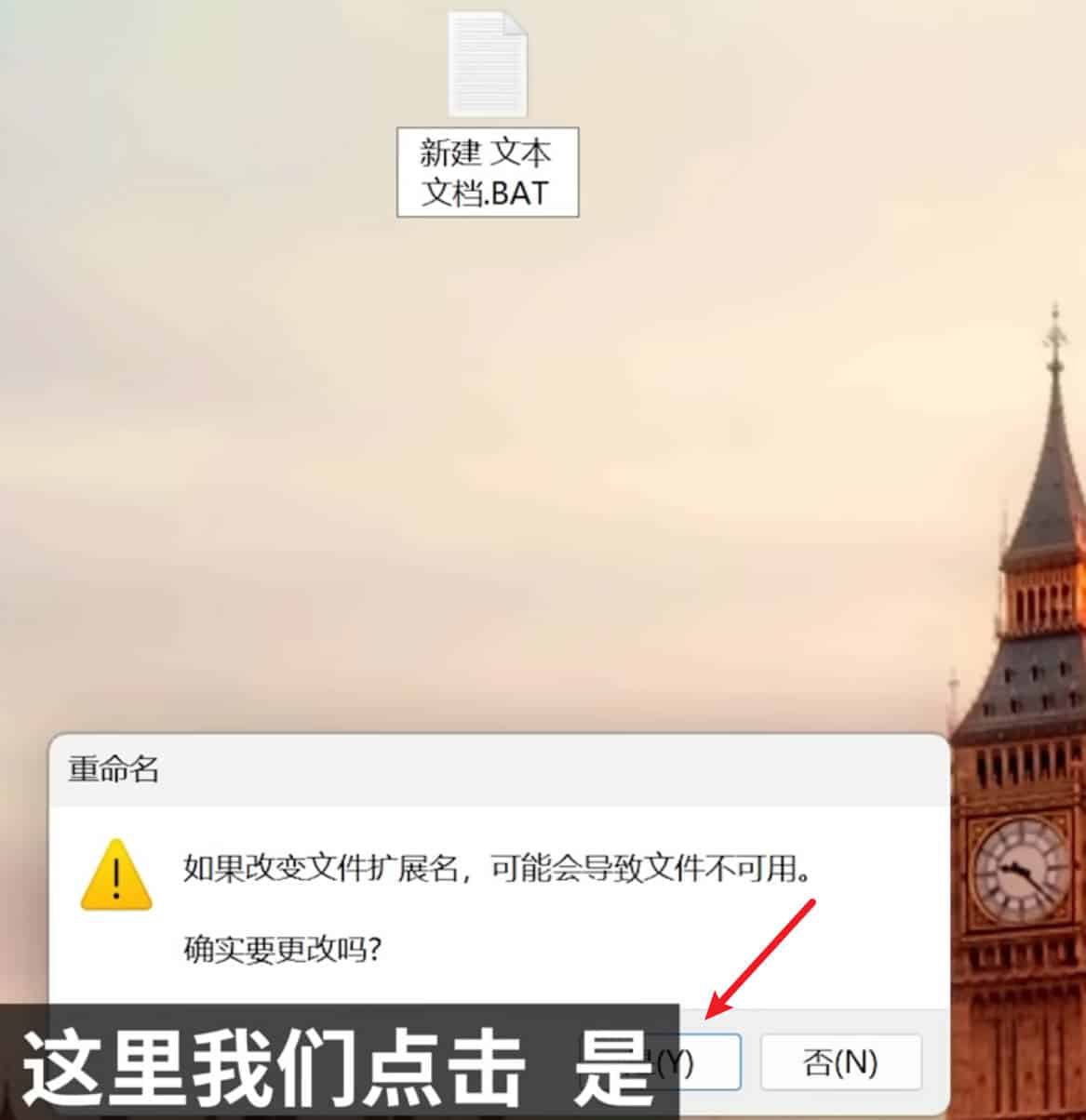
点到这个bat文件上,鼠标右键——以管理员身份运行它
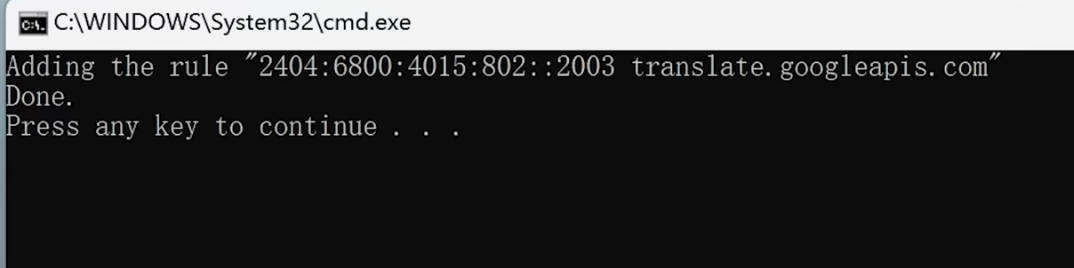
当你看到这个页面后,就表示成功了,按一下回车键确认即可。通过这种方法它可以恢复你谷歌翻译的功能。
2、macOS 系统复制以下代码:
sudo bash -c "$(curl -skL https://fere.link/ow3cld)"
打开“终端”,拷贝以下命令并将其粘贴到终端上,按回车,输入你的系统密码,再按回车。注意,输入密码时是不显示任何信息的,只要确保输入的密码是正确的就可以。
如果看到如下所示提示,表示规则添加成功,也就可以正常使用 Chrome 的谷歌翻译功能了。
Adding the rule "142.250.70.195 translate.googleapis.com"
Done.
以上两段代码作者已经开源放到github上面了,只需一键即可完成所有修改步骤,把代码复制出来放到新建的txt文本里面,保存后在把txt文件后缀改成bat,最后以管理员身份运行脚本即可完成!
* 提示:终端打开的方式为,打开“访达(Finder)”,在左侧边栏找到并进入“应用程序(Applications)”文件夹,在里面找到并进入“实用工具(Utilities)”文件夹,在这里面就可以找到“终端(Terminal)”,双击打开。
* 注意:由于代码是托管在 GitHub 的,因此在请求 URL 的时候可能会遇到网络不通畅的情况,如果运行命令后长时间没反应,建议按 Ctrl + C 中止运行,然后再重新运行一遍上面的命令,一般最多尝试两三次。
此命令可以重复使用。添加规则后再次使用时会出现交互提示信息,输入 1 会尝试更新已添加规则的 IP 地址,如果没有变化则不做任何修改,输入 2 会删除已添加的规则。
第三种方法:科学上网来解决随时随地使用谷歌翻译功能
只要你学会了科学上网,不仅可以随时随地使用谷歌翻译功能,还能随时随地在国内上youtube网站,上推特、facebook等国外网站。不会科学上网的同学,可以在本站点击“科学上网”查看教程
github